

YCCTEAM Wireless Pro Controller Gamepad Compatible with Switch Support NFC, Wakeup, Screenshot and Vibration Functions
Product Description
YCCTEAM Switch controller
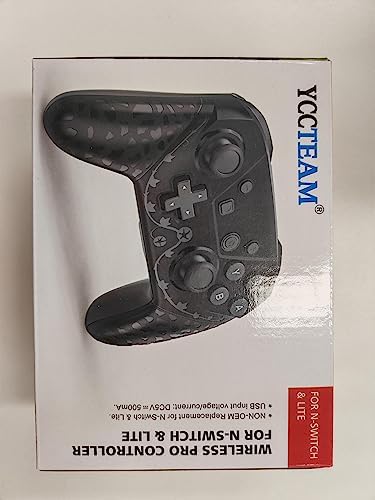
Wireless Switch Pro Controller


 1 Wake Up Function 2 NFC Function 3 Dual Vibration 4 Six-Axis

 1 Buttons Function 2 Happy playtime

YCCTEAM Switch Controller
Add to Cart
Add to Cart
Add to Cart
Add to Cart
Customer Reviews
4.4 out of 5 stars
11,396
4.5 out of 5 stars
4,567
4.0 out of 5 stars
107
4.2 out of 5 stars
244
—
—
Price
$25.99$25.99
$25.99$25.99
$21.99$21.99
$23.99$23.99
—
—
Hardware Platform
Switch/Lite/Switch OLED
Switch/Lite/Switch OLED
Switch/Lite/Switch OLED
Switch/Lite/Switch OLED
Switch/Lite/Switch OLED /PC
Switch/Lite/Switch OLED /PC
Function
High Sensitivity
High Sensitivity
Adjustable Turbo&Motion
Adjustable Turbo&Motion
Programmbale & Turbo&RGB LIGHT
Programmbale & Turbo&RGB LIGHT
Function
6-Axis &Vibration
6-Axis &Vibration
6-Axis Adjustable Vibration
6-Axis Adjustable Vibration
6-Axis Adjustable Vibration
6-Axis Adjustable Vibration
Function
NFC&Wake Up
NFC&Wake Up
NFC&Wake Up
NFC&Wake Up
Dual Function & Wake Up
Dual Function & Wake Up
Color
Black
Black
Black/Red/Blue
Black
Blck Gold
White Green
Does this controller work with Switch OLED?
Yes, this controller is compatible with Switch OLED, as well as Nintendo Switch and Switch Lite
How do I calibrate joystick drift
Use the console’s built-in system menu to calibrate the joystick. Go to System Settings > Controllers and Sensors > Calibtate Control Sticks . Note: Please do not touch the Joystick when pair to the switch controller
One Button Instantly Re-sync
To re-connect your console, press the (Home) button and release it once the four LED lights flash, and it will turn on the system in 3-10 seconds.
How to Connect ?
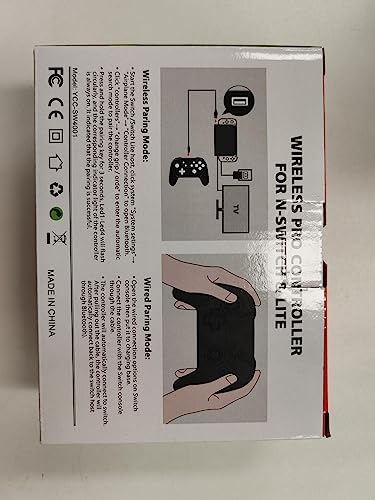
Step 1: Turn on the console>Go to System Setting – Aliplane Mode – Controller Connection(Bluetooth), click ‘On’>Go to ‘Controllers’ setting – Click ‘Change Grip/Order’>Press (Home) button of the Switch controller until the LED light flash.
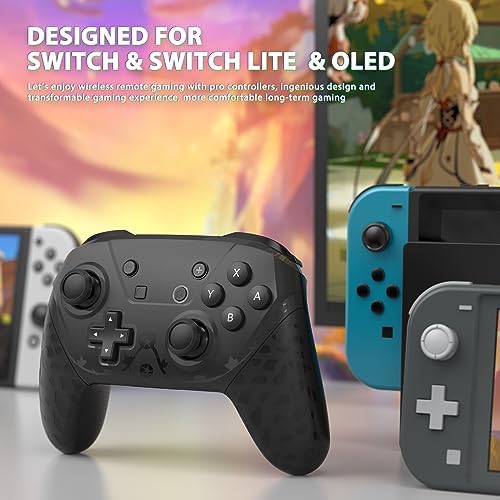
The switch pro controller is fully compatible with switch/ switch lite/ switch oled, also compatible with some windows pc and android/ ios phone games.
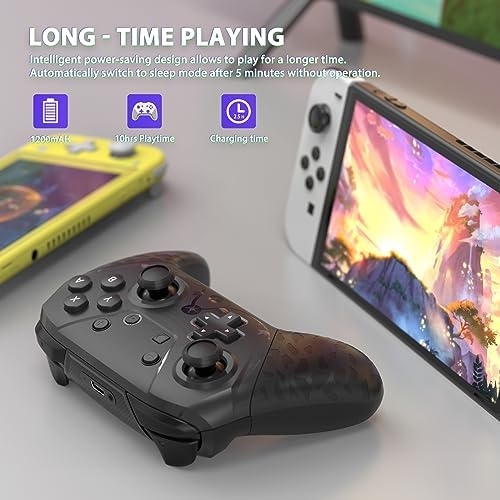
The switch controller pro built-in powerful capacity. can last for up to 10 hours of playtime when fully charged, just requiring only 2 hours of charging time.
The wireless switch pro controller provide stability and direction by sensing motion caused by vibrations, that help you make a quick response in your Switch games.
The pro switch controller built-with ergonomic design and non-slip handheld design allow you to use it for a long time to experience the fun of the game and your hands will not be tired.
If you have any questions, please feel free to contact us directly on amazon, we will do our best to all of our customers, friendly support team for quick solutions.
$25.99






Price: $25.99
(as of Apr 08, 2024 16:04:44 UTC – Details)

Product Description
YCCTEAM Switch controller
Wireless Switch Pro Controller
1 Wake Up Function 2 NFC Function 3 Dual Vibration 4 Six-Axis
1 Buttons Function 2 Happy playtime
YCCTEAM Switch Controller
Add to Cart
Add to Cart
Add to Cart
Add to Cart
Customer Reviews
4.4 out of 5 stars
11,396
4.5 out of 5 stars
4,567
4.0 out of 5 stars
107
4.2 out of 5 stars
244
—
—
Price
$25.99$25.99
$25.99$25.99
$21.99$21.99
$23.99$23.99
—
—
Hardware Platform
Switch/Lite/Switch OLED
Switch/Lite/Switch OLED
Switch/Lite/Switch OLED
Switch/Lite/Switch OLED
Switch/Lite/Switch OLED /PC
Switch/Lite/Switch OLED /PC
Function
High Sensitivity
High Sensitivity
Adjustable Turbo&Motion
Adjustable Turbo&Motion
Programmbale & Turbo&RGB LIGHT
Programmbale & Turbo&RGB LIGHT
Function
6-Axis &Vibration
6-Axis &Vibration
6-Axis Adjustable Vibration
6-Axis Adjustable Vibration
6-Axis Adjustable Vibration
6-Axis Adjustable Vibration
Function
NFC&Wake Up
NFC&Wake Up
NFC&Wake Up
NFC&Wake Up
Dual Function & Wake Up
Dual Function & Wake Up
Color
Black
Black
Black/Red/Blue
Black
Blck Gold
White Green
Does this controller work with Switch OLED?
Yes, this controller is compatible with Switch OLED, as well as Nintendo Switch and Switch Lite
How do I calibrate joystick drift
Use the console’s built-in system menu to calibrate the joystick. Go to System Settings > Controllers and Sensors > Calibtate Control Sticks . Note: Please do not touch the Joystick when pair to the switch controller
One Button Instantly Re-sync
To re-connect your console, press the (Home) button and release it once the four LED lights flash, and it will turn on the system in 3-10 seconds.
How to Connect ?
Step 1: Turn on the console>Go to System Setting – Aliplane Mode – Controller Connection(Bluetooth), click ‘On’>Go to ‘Controllers’ setting – Click ‘Change Grip/Order’>Press (Home) button of the Switch controller until the LED light flash.
The switch pro controller is fully compatible with switch/ switch lite/ switch oled, also compatible with some windows pc and android/ ios phone games.
The switch controller pro built-in powerful capacity. can last for up to 10 hours of playtime when fully charged, just requiring only 2 hours of charging time.
The wireless switch pro controller provide stability and direction by sensing motion caused by vibrations, that help you make a quick response in your Switch games.
The pro switch controller built-with ergonomic design and non-slip handheld design allow you to use it for a long time to experience the fun of the game and your hands will not be tired.
If you have any questions, please feel free to contact us directly on amazon, we will do our best to all of our customers, friendly support team for quick solutions.
User Reviews
Be the first to review “YCCTEAM Wireless Pro Controller Gamepad Compatible with Switch Support NFC, Wakeup, Screenshot and Vibration Functions”
Related Products


![USB Wireless Gaming Controller Gamepad for PC/Laptop Computer(Windows XP/7/8/10) & PS3 & Android & Steam – [Black] (black)](https://m.media-amazon.com/images/I/4105blCzLFL.jpg)

$25.99

There are no reviews yet.