

Controller for PS4/Slim/Pro/Nintendo Switch/PC, Cool RGB Gamepad with Dual Vibration/Motion Sensor/9 Adjustable LED Colors/TURBO/Program Buttons
Product Description

Connecting PS4/Nintendo Switch compatible wireless controllers is easy!
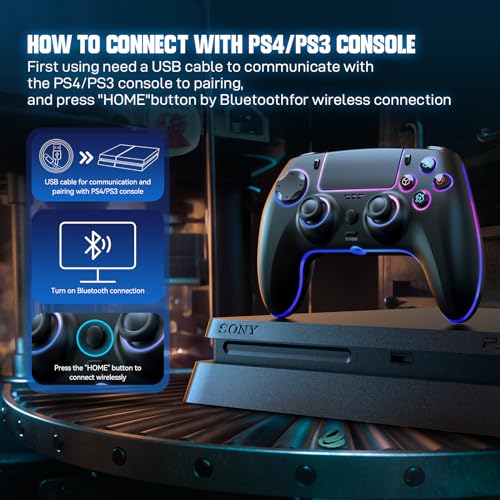
1.To connect the PS4/Nintendo Switch console, you must first connect to the PS4/Nintendo Switch console using a USB cable. During the connection process, the programme will be activated automatically, code matching will be performed manually, and the controller can be connected wirelessly via Bluetooth by pressing the HOME button.
2. After establishing the USB connection, press the HOME button. The LED channel light of the controller shows one colour and stays on, indicating that the host computer is connected.

Setting the RGB function
(1) Press the LIGHT+R3 buttons at the same time (right joystick down, handle vibrates once) to switch the light effect mode. Each press switches the light effect mode (Colour Shift – Monochrome Constant Light (Monochrome Cycle Shift) Breathing – Monochrome Breathing).
(2) In Colour Shift mode, press the LIGHT+L3 buttons simultaneously (press the left joystick downwards) to stop the current Colour Light Effect mode.
(3) In Monochrome Constant Breathing mode, press the LIGHT+L3 buttons simultaneously (press the left joystick down) to change the light colour.
(4) In Monochrome Cyclic Breathing Mode, press the LIGHT+L3 button at the same time (press the left joystick downward) to pause the current breathing state, and press the button again to restart Monochrome Cyclic Breathing Mode.
(5) In Monochrome Breathing Mode, press the LIGHT+L3 button simultaneously (press the left joystick downwards) to switch between different coloured monochrome breathing states.
(6) In Breathing Mode, press LIGHT+ (UP/DOWN arrow buttons) at the same time to adjust the brightness of the RGB lighting effect. Each time you press the combination button, the brightness can be adjusted by one level; the LIGHT+UP combination button increases the brightness, and the LIGHT+DOWN button combination dims the brightness.
(7) Press and hold the L3+R3 button for 3 seconds to switch the RGB light off or on. The light effect setting has a memory function, the currently set light effect mode will be saved automatically.


.🎮Widely Compatible – Compatible with PS4/Pro/Slim,Play-Station+4,Dual+Shock+4, Nintendo Switch/Lite/OLED, Window PC 10/11,iOS,Android HID Model,PS3,Mac.
🎮Custom LED Lights – RGB coloured lights with 4 chroma lighting modes and 9 colours, thousands of colour combinations to customise the PS4 controller.
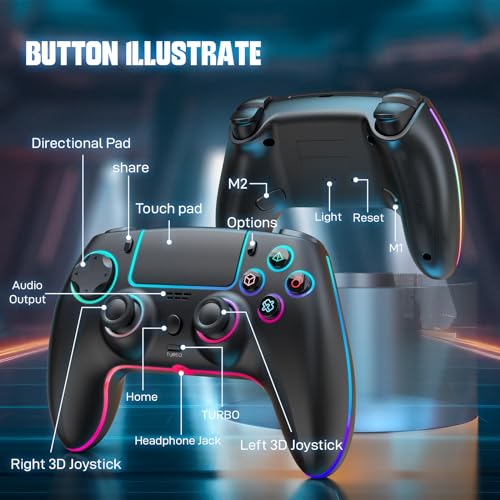
🎮Program Buttons – M1/M2 back buttons can map basic function keys of A/B/X/Y/L/ZL/R/ZR/L3/R3/D-pad for quicker reactions and to customize your gameplay.
🎮Super Turbo – The TURBO function on the PS4 controller allows you to perform movements at a faster speed. Offers you a leading advantage in front of any competitor.
🎮Headset Compatible – Plug in your favorite 3.5 mm headset through the stereo headset jack. Enjoy game sound and voice chat, making the gaming experience richer!
$21.99


Price: $21.99
(as of Apr 06, 2024 09:12:51 UTC – Details)

Product Description
Connecting PS4/Nintendo Switch compatible wireless controllers is easy!
1.To connect the PS4/Nintendo Switch console, you must first connect to the PS4/Nintendo Switch console using a USB cable. During the connection process, the programme will be activated automatically, code matching will be performed manually, and the controller can be connected wirelessly via Bluetooth by pressing the HOME button.
2. After establishing the USB connection, press the HOME button. The LED channel light of the controller shows one colour and stays on, indicating that the host computer is connected.
Setting the RGB function
(1) Press the LIGHT+R3 buttons at the same time (right joystick down, handle vibrates once) to switch the light effect mode. Each press switches the light effect mode (Colour Shift – Monochrome Constant Light (Monochrome Cycle Shift) Breathing – Monochrome Breathing).
(2) In Colour Shift mode, press the LIGHT+L3 buttons simultaneously (press the left joystick downwards) to stop the current Colour Light Effect mode.
(3) In Monochrome Constant Breathing mode, press the LIGHT+L3 buttons simultaneously (press the left joystick down) to change the light colour.
(4) In Monochrome Cyclic Breathing Mode, press the LIGHT+L3 button at the same time (press the left joystick downward) to pause the current breathing state, and press the button again to restart Monochrome Cyclic Breathing Mode.
(5) In Monochrome Breathing Mode, press the LIGHT+L3 button simultaneously (press the left joystick downwards) to switch between different coloured monochrome breathing states.
(6) In Breathing Mode, press LIGHT+ (UP/DOWN arrow buttons) at the same time to adjust the brightness of the RGB lighting effect. Each time you press the combination button, the brightness can be adjusted by one level; the LIGHT+UP combination button increases the brightness, and the LIGHT+DOWN button combination dims the brightness.
(7) Press and hold the L3+R3 button for 3 seconds to switch the RGB light off or on. The light effect setting has a memory function, the currently set light effect mode will be saved automatically.
.🎮Widely Compatible – Compatible with PS4/Pro/Slim,Play-Station+4,Dual+Shock+4, Nintendo Switch/Lite/OLED, Window PC 10/11,iOS,Android HID Model,PS3,Mac.
🎮Custom LED Lights – RGB coloured lights with 4 chroma lighting modes and 9 colours, thousands of colour combinations to customise the PS4 controller.
🎮Program Buttons – M1/M2 back buttons can map basic function keys of A/B/X/Y/L/ZL/R/ZR/L3/R3/D-pad for quicker reactions and to customize your gameplay.
🎮Super Turbo – The TURBO function on the PS4 controller allows you to perform movements at a faster speed. Offers you a leading advantage in front of any competitor.
🎮Headset Compatible – Plug in your favorite 3.5 mm headset through the stereo headset jack. Enjoy game sound and voice chat, making the gaming experience richer!
User Reviews
Be the first to review “Controller for PS4/Slim/Pro/Nintendo Switch/PC, Cool RGB Gamepad with Dual Vibration/Motion Sensor/9 Adjustable LED Colors/TURBO/Program Buttons”
Related Products




![ZD-V+ USB Wired Gaming Controller Gamepad For PC/Laptop Computer(Windows XP/7/8/10/11) & PS3 & Android & Steam – [Black]](https://m.media-amazon.com/images/I/41Ddk2Xp33L._AC_.jpg)
$21.99

There are no reviews yet.