
NexiGo Controller (No Deadzone) for Switch/Switch Lite/OLED, Bluetooth Wireless Controllers for Nintendo Switch with Vibration, Motion, Turbo and LED Light, Gift for Gamer Girls Boys (Violet Unicorn)
Product Description


 1 RGB Ring Light 2 Adjustable Vibration 3 Six-Axis Gyroscope Sensor 4 Ergonomic Design


NexiGo Controllers Collection
Add to Cart
Add to Cart
Add to Cart
Add to Cart
Add to Cart
Add to Cart
Add to Cart
Customer Reviews
4.5 out of 5 stars
973
4.5 out of 5 stars
973
4.5 out of 5 stars
4,045
4.3 out of 5 stars
2,024
4.0 out of 5 stars
469
4.3 out of 5 stars
264
4.7 out of 5 stars
414
Price
$39.99$39.99
$39.99$39.99
$39.99$39.99
$34.99$34.99
$27.99$27.99
$19.99$19.99
$29.99$29.99
Compatibility
Nintendo Switch, Lite, OLED
Nintendo Switch, Lite, OLED
Nintendo Switch, Lite, OLED
Nintendo Switch
Nintendo Switch, Switch OLED
4 Joy-Cons,1 Pro Controller
Switch, NexiGo Gripcon
Charging Ports
At Top of Controller
At Top of Controller
At Top of Controller
At Bottom of Controller
At Bottom of Controller
Charging Slot
—
LED Indicators
✓
✓
✓
—
—
✓
—
Feature
RGB Lights, Turbo
RGB Lights, Turbo
RGB Lights, Ergonomic Design
Ergonomic Design
Ergonomic Design, Mapping
Fast Charging
Large Capacity, Portable
Color
Violet Unicorn
Pink Unicorn
Cosmic Nebula
Black
Black
Cosmic Nebula
Black
How do I use the RGB lighting function on the joysticks?
Press and hold the “Turbo” button, then press either joystick to change the lights’ colors. Press and hold the “Turbo” button, then double-tap one of the joysticks to activate the special RGB lighting mode.
Does this controller work with Switch OLED?
Yes, this controller is compatible with Switch OLED, as well as Nintendo Switch and Switch Lite.
How do I adjust the vibration strength?
Press the “Turbo” button, and simultaneously nudge the joystick backward/forward to decrease/increase the vibration strength.
How do I calibrate the motion controls?
Use the console’s built-in system menu to calibrate the motion controls. Go to System Settings > Controllers and Sensors > Calibrate Motion Controls.
【RGB Lights】The NS32 is designed with customizable RGB ring lights to add some flair to your controller.
【Dual Motors and Six-Axis Gyroscope】This controller comes with dual haptic feedback motors and six-axis gyroscopic sensors to give you an immersive gaming experience.
【Ergonomic Design】Made of high-quality ABS materials with a slip-resistant design that reduces stress on your hands while playing for longer periods of time.
【Fast Charging】This controller fully charges in 2-3 hours, and the battery will last for up to 10 hours of gameplay.
【Bluetooth Connection】The controller conveniently pairs with your Switch via Bluetooth.
$39.99
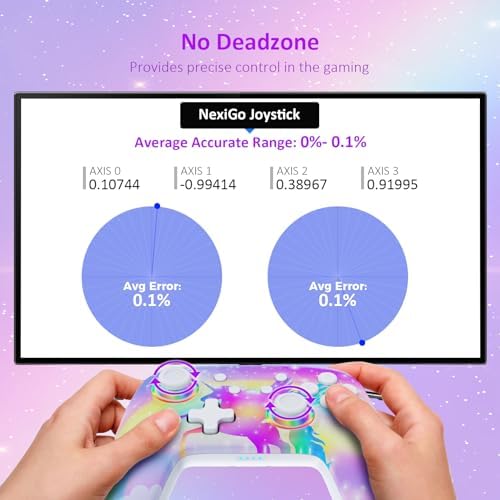


Price: $49.99 - $39.99
(as of Apr 11, 2024 16:06:03 UTC – Details)

Product Description
1 RGB Ring Light 2 Adjustable Vibration 3 Six-Axis Gyroscope Sensor 4 Ergonomic Design
NexiGo Controllers Collection
Add to Cart
Add to Cart
Add to Cart
Add to Cart
Add to Cart
Add to Cart
Add to Cart
Customer Reviews
4.5 out of 5 stars
973
4.5 out of 5 stars
973
4.5 out of 5 stars
4,045
4.3 out of 5 stars
2,024
4.0 out of 5 stars
469
4.3 out of 5 stars
264
4.7 out of 5 stars
414
Price
$39.99$39.99
$39.99$39.99
$39.99$39.99
$34.99$34.99
$27.99$27.99
$19.99$19.99
$29.99$29.99
Compatibility
Nintendo Switch, Lite, OLED
Nintendo Switch, Lite, OLED
Nintendo Switch, Lite, OLED
Nintendo Switch
Nintendo Switch, Switch OLED
4 Joy-Cons,1 Pro Controller
Switch, NexiGo Gripcon
Charging Ports
At Top of Controller
At Top of Controller
At Top of Controller
At Bottom of Controller
At Bottom of Controller
Charging Slot
—
LED Indicators
✓
✓
✓
—
—
✓
—
Feature
RGB Lights, Turbo
RGB Lights, Turbo
RGB Lights, Ergonomic Design
Ergonomic Design
Ergonomic Design, Mapping
Fast Charging
Large Capacity, Portable
Color
Violet Unicorn
Pink Unicorn
Cosmic Nebula
Black
Black
Cosmic Nebula
Black
How do I use the RGB lighting function on the joysticks?
Press and hold the “Turbo” button, then press either joystick to change the lights’ colors. Press and hold the “Turbo” button, then double-tap one of the joysticks to activate the special RGB lighting mode.
Does this controller work with Switch OLED?
Yes, this controller is compatible with Switch OLED, as well as Nintendo Switch and Switch Lite.
How do I adjust the vibration strength?
Press the “Turbo” button, and simultaneously nudge the joystick backward/forward to decrease/increase the vibration strength.
How do I calibrate the motion controls?
Use the console’s built-in system menu to calibrate the motion controls. Go to System Settings > Controllers and Sensors > Calibrate Motion Controls.
【RGB Lights】The NS32 is designed with customizable RGB ring lights to add some flair to your controller.
【Dual Motors and Six-Axis Gyroscope】This controller comes with dual haptic feedback motors and six-axis gyroscopic sensors to give you an immersive gaming experience.
【Ergonomic Design】Made of high-quality ABS materials with a slip-resistant design that reduces stress on your hands while playing for longer periods of time.
【Fast Charging】This controller fully charges in 2-3 hours, and the battery will last for up to 10 hours of gameplay.
【Bluetooth Connection】The controller conveniently pairs with your Switch via Bluetooth.
User Reviews
Be the first to review “NexiGo Controller (No Deadzone) for Switch/Switch Lite/OLED, Bluetooth Wireless Controllers for Nintendo Switch with Vibration, Motion, Turbo and LED Light, Gift for Gamer Girls Boys (Violet Unicorn)”
Related Products




$39.99

There are no reviews yet.